Explore top arcade joystick and button kits that simplify building custom MAME cabinets. This guide features five well-reviewed kits from trusted brands, highlighting USB encoders, LED lighting, and durable buttons and joysticks. Each option is suitable for Windows systems and ready for 1-2 or more players, helping you create a responsive, authentic arcade experience at home.
| Product | Brand | Notes |
|---|---|---|
| EG STARTS 2 Player Arcade Games DIY Kit Parts | EG STARTS | LED-lit, 2-player, MAME compatible |
| EG STARTS Arcade Buttons 1 Player DIY Kit | EG STARTS | 5V LED buttons, 8-way joystick |
| Hikig 2 Player LED Arcade Buttons and Joysticks DIY Kit | Hikig | 2 players, LED buttons, MAME compatible |
| EG STARTS 4 Player Classic DIY Arcade Joystick Kit | EG STARTS | 4 players, USB encoder included |
| EG STARTS 2 Player Classic Arcade Game DIY Part | EG STARTS | 8-way joystick, 18 push buttons |
EG STARTS 2 Player Arcade Games DIY Kit Parts

This kit provides 2 ellipse-style joystick handles and 20 LED-lit arcade buttons in red and blue. It features a 100% zero-delay encoder and USB compatibility for Windows systems, delivering a responsive, two-player arcade experience. The components are designed for DIY MAME setups and act as a compact, complete accessory pack for a classic cabinet build.
EG STARTS Arcade Buttons 1 Player DIY Kit
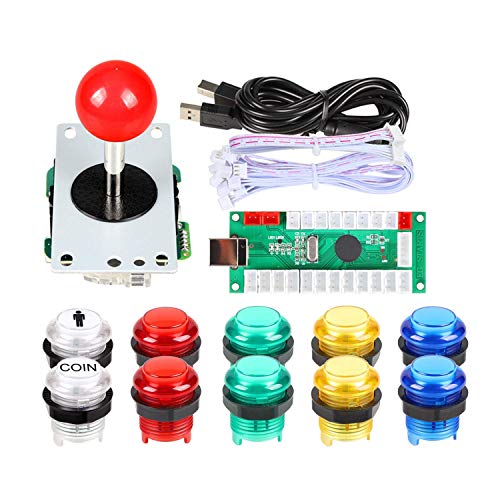
Includes a high-quality 8-way joystick and 5V LED arcade pushbuttons with strong lighting effects. Designed for single-player arcade sticks and PC games, this kit uses a DC 5V LED pushbutton system and a USB encoder. It’s built for long life, with microswitches rated for extensive cycling and durable construction for reliable one-player setups.
Hikig 2 Player LED Arcade Buttons And Joysticks DIY Kit

This DIY kit includes two joysticks and twenty LED arcade buttons in red and blue, offering a modern DIY solution for MAME and Raspberry Pi-based cabinets. The kit emphasizes zero-delay encoder performance, ensuring responsive gameplay across Windows systems. It supports dual-player configurations for custom arcade cabinets or arcade-style consoles.
EG STARTS 4 Player Classic DIY Arcade Joystick Kit
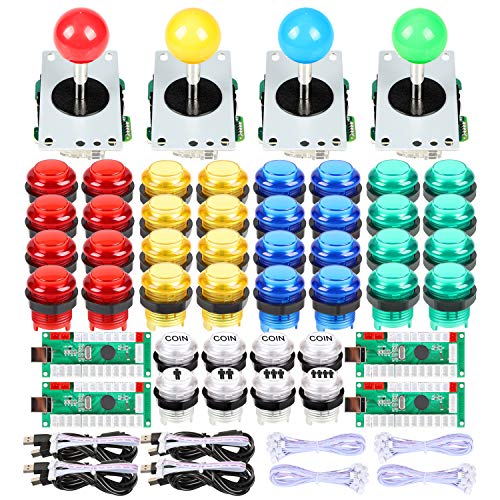
Designed for four players, this kit includes USB encoder support and a 4/8-way stick option, suitable for 4-player MAME or arcade projects. It emphasizes high-quality materials, heat-resistant plastic, and easy integration into cabinet builds. The included parts are ideal for larger cabinets and multiplayer setups requiring robust, durable components.
EG STARTS 2 Player Arcade Game DIY Part For Mame
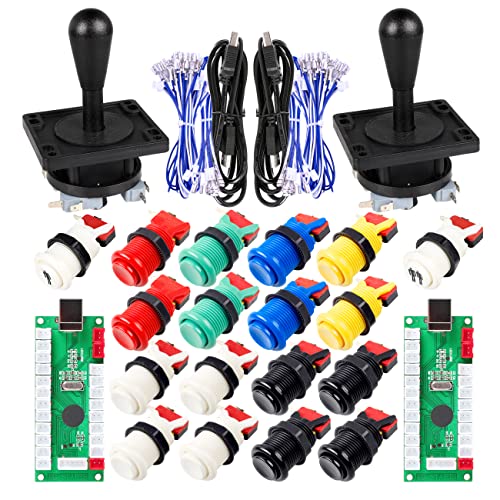
This two-player kit includes an 8-way joystick and 18 arcade push buttons with a configurable control layout. It is designed for wood or metal control panels and fits 1-1/8″ mounting holes. Microswitches are tested for long cycle life, making this option a solid base for a home arcade cabinet or retrofit project.
EG STARTS Arcade DIY Kit USB Encoder To PC Joystick

This kit bundles a 5-pin joystick, USB encoder, and 10 chrome LED buttons for a complete one-player setup, plus coin buttons. It’s ideal for a compact MAME or PC-based arcade project and emphasizes straightforward installation and reliable LED illumination for a crisp arcade feel.
EG STARTS 2 Player Arcade Games DIY Kit Parts

Another 2-player option from EG STARTS, featuring ellipse joystick handles and 20 LED-lit arcade buttons in mixed colors. It emphasizes LED lighting, zero-delay encoding, and broad Windows compatibility, making it a versatile choice for rapid, authentic arcade builds.
Buying Guide: Key Purchase Considerations
- Number of players and control layout: Choose kits that match your cabinet plan (2-player, 4-player, or modular multi-kit solutions).
- Encoder performance: Look for zero-delay or low-latency USB encoders to ensure responsive gameplay, especially for fighting or action games.
- Button and joystick quality: Microswitch durability, button LED brightness, and joystick throw affect feel and longevity.
- Compatibility: Ensure the kit supports Windows systems and your intended microcontroller or Raspberry Pi setup if used in DIY cabinets.
- Mounting and hole size: Check hole diameters (e.g., 24mm for buttons, 28mm for some joysticks) and panel thickness compatibility.
- Lighting and aesthetics: LED color options and lighting effects can influence the cabinet’s look and visibility in low light.
- Durability and materials: Heat-resistant plastics and robust mounting hardware improve cabinet reliability.
- Expansion potential: If you plan future upgrades, consider kits that allow adding more buttons or additional players without a complete redesign.
When selecting a kit, balance price with build complexity and your target arcade experience. Read product specifications, confirm compatibility with your cabinet design, and verify that the included encoder and wiring meet your needs for ongoing projects.